The Key to Staying Organized
If you have taken the time to “get” organized, then honor the precious effort you spent by “staying” organized.
How?
TIP: Live by these 2 simple action-oriented guidelines:
- Don’t put it down; put it away (designate a home for everything; you won’t waste time searching when you know where you’ve placed items)
- One thing in; one thing out (if you obtain something new, donate something you no longer use)


Is Time Controlling You?
Have you ever quickly searched a website and before you know it, 45 minutes has passed? This will help keep track of time.
Time Timer is a visual timer that shows the passage of time. As the time elapses, the red disk disappears. A digital stopwatch is NOT the same; your brain sees that as abstract.
Every age group benefits:
- Toddlers: Use it for time-outs or say “When the red disk disappears, it’s time to go.”
- Teachers – Set it for 15-minute assignments.
- All ages – Use it for practicing instruments.
TIP: My favorite use is to keep meetings effectively on track!

Powerful Questions = Whether to Keep or Donate
You’ve resolved to pare down. How do you now decide what to keep? Choose the question that speaks to YOU and ask it of every item:
- Does this serve me in my life today?
- If I were shopping right now, would I pay full price for this?
- Would this be worth packing up if I were to move?
- Does it lift me up or drag me down?
- Am I keeping this out of obligation?
- Would someone else enjoy this more than I do?
TIP: Listen to your gut. It always answers you immediately.

Self-purging Filing System
Low-maintenance, self-purging filing?
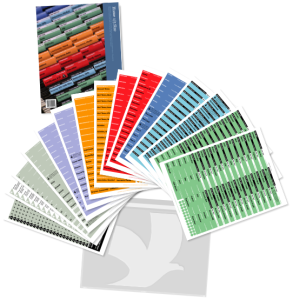
It’s possible with FreedomFiler’s color-coded system, which dictates how long files are kept: RED = permanent, ORANGE = remove/replace, BLUE = current tax documents, GRAY = active files, INDIGO = 10 years’ tax archives.
TIP: Use GREEN monthly folders = 12 for ODD year and 12 for EVEN year which hold receipts, paid bills, etc. When each new year begins, as you file new papers in folders, skim those inside (that are 2 years old now) to confirm their shred-worthiness.
FreedomFiler triggers you to purge your files so you never need a file clean-out day.
Visit My Resource Page to watch a 3-minute FreedomFiler video or to watch my KUTV organizing segments.

Track Time Without Confinement
If you want accountability to accomplish tasks, yet hate dictating every moment of your day into calendar time slots, consider an option author Julie Morgenstern recommends:
TIP: Write down areas of your life in which you want to spend a certain amount of time on within a week (exercise, learning a new skill, practicing an instrument) and draw boxes, each signifying e.g. 15 minutes or 1 hour. As you devote that chunk of time, check off the boxes to easily reach your goal.
Here is mine that I use to keep me on track with practicing piano:

Visit My Resources Page to watch my 3-4 minute KUTV organizing segments.
- « Previous Page
- 1
- …
- 5
- 6
- 7
- 8
- 9
- Next Page »